Best corporate finance software: Quick overview
Enterprise corporate finance software
Enterprise finance teams deal with scale, complexity, and risk that smaller organizations simply don’t. These platforms are built to support multi-entity structures, high data volumes, complex consolidations, rigorous controls, and long-range planning across departments and geographies.
- Cube: FP&A software that supports budgeting, forecasting, reporting, and analysis in Excel and Google Sheets. Includes workflow controls, audit trails, integrations, and AI features.
- Workday Adaptive Planning: FP&A platform for planning, modeling, reporting, and workforce planning in a cloud environment.
- Anaplan: Planning and forecasting platform for scenario modeling, connected planning, and cross-functional collaboration.
- Oracle NetSuite: ERP system with financial management, consolidation, and reporting for multi-entity organizations.
- SAP S/4HANA Finance: ERP finance platform for core finance processes, analytics, and global compliance workflows.
- Oracle Essbase: Analytics and modeling tool for multidimensional analysis, scenario testing, and financial reporting.
Mid-market corporate finance software
Mid-market finance teams often need more structure, automation, and visibility than entry-level accounting tools can provide, without the overhead and implementation burden of enterprise systems. These platforms are designed to support growing organizations with multi-entity reporting, stronger controls, and more advanced planning capabilities, while remaining practical to implement and manage with leaner teams.
They typically offer a balance of depth and usability, helping finance teams improve forecasting, reporting, and operational control as the business scales.
- Sage Intacct: Cloud financial management software for core accounting, reporting, dimensional tracking, and workflow automation.
- Acumatica Cloud ERP: ERP platform for finance, inventory, operations, and reporting, with industry editions and customization options.
- Prophix: FP&A software for budgeting, forecasting, reporting, and workflow automation.
- Vena Solutions: FP&A platform for planning, reporting, and process controls with an Excel-based interface.
- Multiview ERP: ERP software for financial management, reporting, and audit trail visibility through centralized data.
Small business corporate finance software
Small businesses typically need finance software that keeps day-to-day operations organized without adding heavy setup, administration, or cost. These tools focus on core workflows like invoicing, expense tracking, bank reconciliation, and straightforward reporting, with optional add-ons for payroll, payments, and light automation.
They’re a strong fit when you need clean books, clear cash visibility, and reliable reporting, but don’t need complex consolidation, advanced modeling, or enterprise-level controls.
- QuickBooks: Accounting software for invoicing, expense tracking, reporting, dashboards, and payroll add-ons.
- Xero: Accounting platform for bank feeds, invoicing, bills, reporting, and multi-currency workflows.
- FreshBooks: Accounting and invoicing software for time tracking, expenses, client billing, and basic reporting.
- Zoho Finance Plus: Finance suite for invoicing, expenses, subscriptions, order management, and financial reporting.
- SAP Business One: ERP software for finance, purchasing, inventory, and reporting for small businesses.
What is corporate financial software?
Corporate financial software helps organizations manage and optimize their financial operations at scale. These platforms can handle tasks like tracking income, managing budgets, and forecasting future financial scenarios. Corporate finance teams use them to automate daily tasks, reduce manual errors, and maintain audit trails for strategic financial planning and decision-making.
There are two main types of financial management software: Enterprise resource planning (ERP) systems and financial planning & analysis (FP&A) solutions.
Enterprise resource planning software (ERP)
An ERP software is an integrated system that manages core processes, including finance, human resources, supply chain, manufacturing, and services. It helps financial management by overseeing all financial operations from a single platform.
This makes it easy for financial teams to see a snapshot of their organization’s performance and keep track of historical financial data. The constant communication between different apps improves the likelihood of finding unique opportunities for operational savings and increased revenue.
Financial planning and analysis software (FP&A)
FP&A software is a financial planning, analysis, and reporting solution. It helps combine the historical data of your ERP with the forward-looking data of your plans, budgets, and forecasts.
This helps finance teams bring together an entire financial picture so they can perform detailed analysis to understand what happened in the past, what’s happening right now, and how to plan for the future.
Suppose ERP software is a melting pot that brings all your company’s data together. In that case, FP&A is more of a specialist tool that provides insights into your financial performance for better strategic planning and decision-making.
Key features of corporate financial management software
Financial management software encompasses a spectrum of different functionalities. When searching for the right tool for you, consider the following features to ensure the software meets your specific needs.
Financial tracking
Financial tracking tools allow businesses to monitor and record transactions accurately. Real-time tracking allows teams to spot discrepancies like mismatched sales and inventory early so they can take corrective action before things escalate.
Financial planning and modeling
These tools are for running detailed financial planning and modeling different scenarios, which will help you forecast future performance with precision. Having a clear and accurate picture means you can prepare for various financial situations with far less effort.
Let’s take a manufacturing company preparing for a potential supply chain disruption. The finance team can model different scenarios to anticipate costs, explore alternative suppliers, and plan for inventory adjustments.
Forecasting and budgeting
Financial management software simplifies forecasting and budgeting, which are traditionally among the hardest FP&A tasks to handle. With a constant flow of new information, you can tweak and adjust your predictions in real time as new data becomes available. For example, a SaaS company may use real-time data from subscriptions and churn rates to refine its revenue projections and allocate marketing budgets accordingly.
Financial analysis
Advanced financial analysis algorithms absorb and process vast amounts of data to find insights and trends. They offer a deeper understanding of your financial performance, which allows you to make stronger, data-driven decisions. Financial analysis software can do all of this in a fraction of the time it would take a human.
A healthcare organization, for instance, could use these tools to analyze patient billing data and identify cost-saving opportunities in operational expenses.
Centralized data management
Centralized data management ensures all financial data is stored in one place, making it easy to access and manage. This integrates your enterprise resource planning (ERP) systems, customer relationships management (CRM) platforms, payroll software, and more into one dashboard.
For example, a global e-commerce company could integrate these systems to track regional revenue performance, shipping costs, and payroll expenses in one place.
Detailed and complex reporting
Detailed financial statements help decision-makers craft strategy, report company performance, prepare forecasts, and more. Financial management software produces real-time reports with the exact financial data you want in just a few clicks. For example, a CFO can use software to generate real-time profitability reports segmented by product line or region. These automated reports help save time, reduce errors, and ensure compliance while providing the exact insights needed for effective financial strategies.
Best corporate finance software for financial management
We’ve profiled several software vendors across different categories to give you a more comprehensive insight into the modern finance tech stack.
1. Cube

What it is: AI-powered FP&A software for budgeting, forecasting, and financial analysis
Who it’s for: Mid-size and enterprise FP&A teams looking to save time and grow. Cube also works for hypergrowth SMBs who want a solution that will scale with their organization.
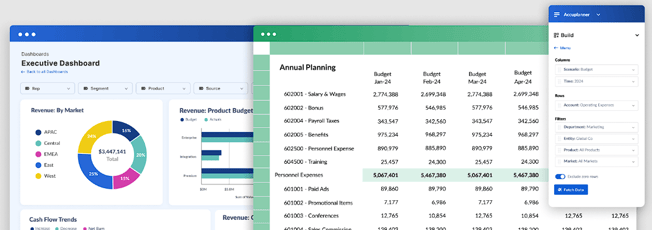
Cube is an AI-powered, spreadsheet-native FP&A platform that empowers teams to drive better planning, performance, and financial intelligence without changing how they work.
With built-in AI, Cube automates manual workflows, detects anomalies across datasets, and delivers predictive insights that help teams forecast with greater accuracy and speed. Users can also access Cube’s AI Analyst to get instant, explainable answers to complex questions—right inside Slack, Microsoft Teams, or the Cube Workspace—enabling smarter, faster decisions without switching tools.
Companies like Smart City Apartment and Instride use Cube for nearly all of their company's financial operations. In terms of return on investment, BlueWind Medical and Edge Fitness Clubs report that they reduced expenses by $100,000 and $300,000 annually after switching to Cube.
Key features:
- AI-powered tools detect anomalies and use predictive modeling to surface actionable insights.
- Automated data consolidation connects data from numerous sources for automated roll-ups and drill-downs.
- Purpose-built AI agents improve data integrity, forecasting, variance analysis, and more for in-depth financial intelligence.
- Native Excel and Google Sheets integrations that are compatible and bi-directional with any spreadsheet.
- User-based controls, validations, and audit trails ensure that the right data goes to the right people at the right time.
- Centralized formulas and KPIs store all your calculations in a central location and manage from a single source of truth.
- Audit trails get straight to the transactions and history behind a single cell of data in just one click.
What customers say: “Cube is the simple version of what you want from a multi-dimension database.” Jesse Ingram VP & Head of Finance, Veryable
Rating: Capterra: 4.6/5.
Pricing: Contact Cube sales team for custom pricing, starting at $30,000 annually.
Learn more about pricing or book a demo.

2. Vena Solutions

What it is: FP&A software
Who it’s for: Vena is good for companies that need the rigid process and planning controls of pre-built FP&A processes or that want to customize a pre-built solution for their unique needs
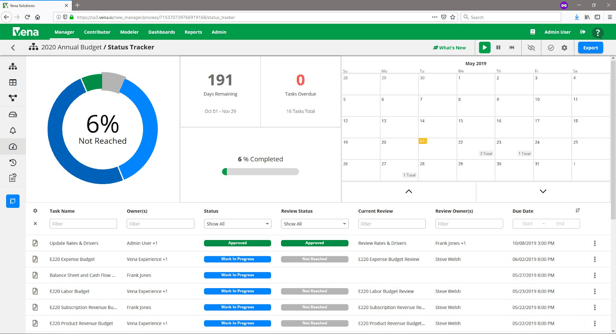
Vena Solutions is a cloud-based predictive analytics and business intelligence tool that automatically generates forecasts and insights from data. Vena also automates variance analysis, identifies discrepancies, and builds ad-hoc reports for your business.
Key features:
- Vena simplifies financial planning and ensures accurate budgeting and forecasting.
- Financial reporting automation creates financial reports, without manual effort and errors.
- Incentive compensation management automates incentive compensation for accuracy and compliance.
- Regulatory compliance helps businesses stay compliant with various financial regulations, reducing the risk of penalties.
- Financial consolidation brings together financial data across multiple departments and entities, providing a unified view.
What customers say: “Vena centers its functionality around Excel, but all your data is securely stored in the cloud rather than within the spreadsheets themselves.”
Rating: Gartner: 4.4/5
Pricing: Pricing is not available on their website.
3. Workday Adaptive Planning

What it is: FP&A software
Who it’s for: This software is suitable for medium to large businesses. Workday Adaptive Planning has the capacity to scale with growing businesses and their financial requirements to keep running
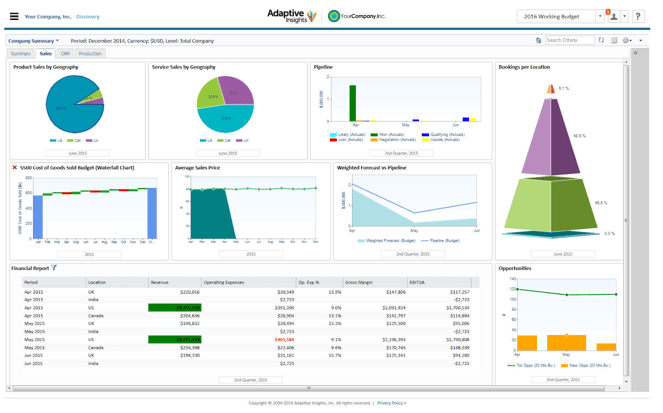
Workday Adaptive Planning is a financial planning and analysis solution used by some of the world’s largest brands. This software enables users to manage cash flow and carry out expense management, revenue management, workforce modeling, capital management, financial close, and more.
Workday Adaptive Planning is cloud-based, mobile-ready, and uses a combination of visualizations, color coding, and a clean and intuitive user interface (UI) to deliver a great user experience (UX).
Key features:
- Cash flow management helps ensure liquidity and efficient resource use.
- Expense management tracks and controls expenses to stay within budget.
- Revenue management handles revenue streams for accurate forecasting and reporting.
- Payroll and workforce management allow for detailed workforce planning and resource optimization.
- Capital management oversees capital expenditures and investments efficiently.
- Planning and forecasting tools make data-driven decisions you can be confident in.
What customers say: “Workday Adaptive Planning is a powerful yet easy-to-use tool that makes budgeting, forecasting, and reporting feel effortless. One drawback of Workday Adaptive Planning is that while it’s feature-rich, some advanced customization options can feel a bit complex and may require additional training or support to fully utilize.”
Rating: G2: 4.3/5
Pricing: Teams need to reach out to Workday Adaptive Planning for pricing.
4. Anaplan

What it is: FP&A software
Who it’s for: Anaplan works for larger enterprises with a strong IT team to support implementation
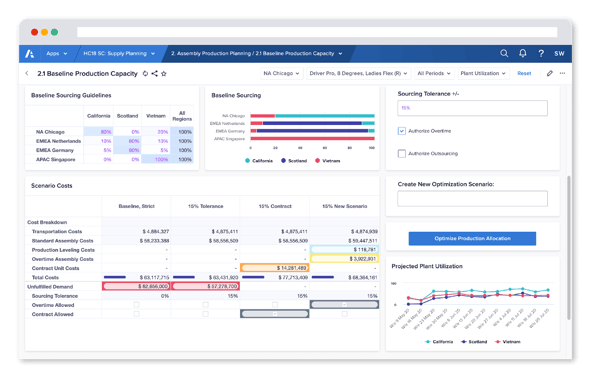
Anaplan is a web-based planning and forecasting application designed to help organizations make decisions by giving them real-time access to data. The application offers the ability to create and manage models, share data across teams, and collaborate on projects.
Anaplan works to help businesses make decisions by evaluating options and trade-offs in the current environment in real time. It also offers signal analysis to uncover insights and adapt to continually changing conditions and markets.
Key features:
- Planning and modeling facilitate detailed planning and accurate forecasting.
- Predictive insights provide real-time data for strategic decisions.
- Enterprise scale accommodates growing data and business complexity.
- Security ensures robust data protection with access controls and encryption.
- Connected planning aligns different departments and functions through integrated planning.
What customers say: “I like Anaplan's planning and modeling features, intelligent engine, user experience, extensibility and scalability.”
Rating: G2: 4.6/5
Pricing: Pricing is not listed on their website.
5. Prophix
.png?width=157&height=37&name=prophix-logo%20(1).png)
What it is: FP&A software
Who it’s for: Prophix works for businesses that need workflow automation
Prophix is an FP&A solution with a focus on corporate performance management. Prophix uses AI and a virtual financial analyst to automate repetitive daily tasks. Their automated budgeting software can also manage budgets for finance teams.
.png?width=541&height=304&name=prophix-view%20(1).png)
Key features:
- Budgeting and planning features simplify processes and improve accuracy.
- Forecasting tools provide accurate projections for future financial scenarios.
- Reporting and analytics generate detailed reports and offer valuable insights.
- Financial consolidation and close tools streamline processes for timely reporting.
- Workflow and automation reduce manual tasks and enhance efficiency.
What customers say: “The customer service team at Prophix is wonderful. We have been able to schedule recurring appointments to track and manage our problems over time.”
Rating: G2: 4.4/5
Pricing: Pricing is not listed on their website.
6. Oracle Essbase
.jpeg?width=150&name=oracle-hyperion-essbase%20(1).jpeg)
What it is: Enterprise performance management software
Who it’s for: Oracle Essbase is ideal for very large enterprises with deep IT resources that already have a robust FP&A solution in place, have analysis teams seeking targeted analytics and modeling tools, and are already invested in Oracle back-office solutions
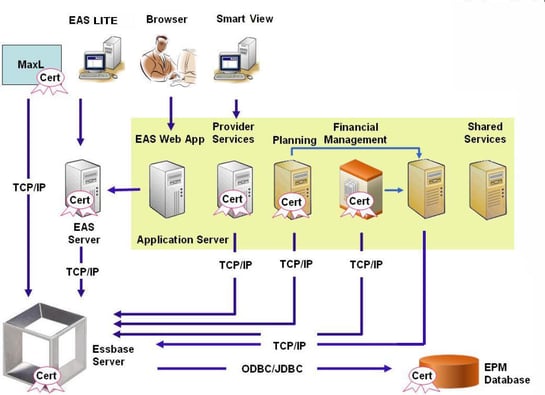
Oracle Essbase is a business analytics solution designed to drive smarter decisions with the ability to quickly test and model complex business assumptions in the cloud or on-premises. Businesses develop and manage analytic applications by using business drivers to model multiple what-if scenarios.
You can interact with Essbase through a web or Microsoft Office interface to analyze, model, collaborate, and report.
Key features:
- Scenario modeling prepares for various business situations with detailed financial scenarios.
- Simple workflows streamline processes and improve efficiency.
- Multidimensional expressions facilitate complex financial analysis.
- Analytics provide advanced capabilities for strategic insights.
- Real-time reporting ensures timely and accurate financial information.
What customers say: “Generally, it is used for financial purposes, but it is flexible to be used for other analytic purposes, like mathematical models, statistical models, and so on.”
Rating: G2: 4.4/5
Pricing: Oracle has a complex pricing system that varies depending on users, licenses, and products needed.
7. Xero

What it is: Accounting software
Who it’s for: Xero is for small to mid-market businesses
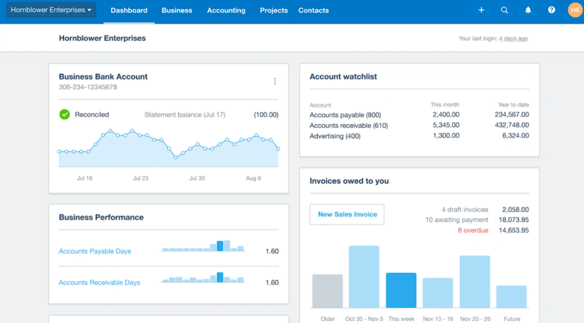
Xero is an accounting software solution that provides an easy-to-use platform for all of your business budgeting and accounting needs. You can pay bills, claim expenses, accept payments, track projects, and connect with all of your banks with Xero.
Xero offers a full financial picture of your business, facilitating tasks such as end-of-year tax returns, invoicing, and reporting.
Key features:
- Bill paying and expense claims provide a comprehensive view of accounts payable.
- Bank connections link your financial accounts for real-time transaction updates.
- Project tracking monitors project costs and profitability.
- Gusto Payroll management streamlines employee payments.
- Inventory and analytics tools help manage stock and provide insights into business performance.
Pricing:
- Early: $20/month
- Growing: $47/month
- Established: $80/month
8. Zoho Finance Plus

What it is: ERP
Who it’s for: ZOHO Finance Plus is for small to mid-market businesses
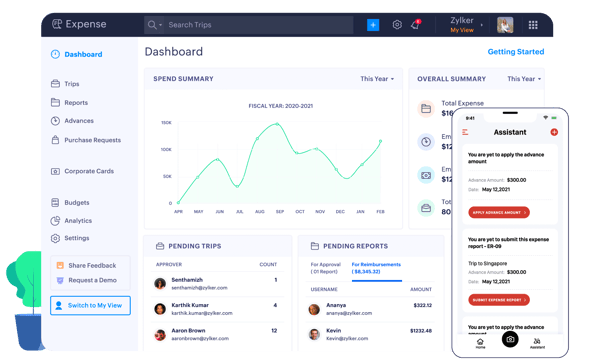
ZOHO Finance Plus is an integrated finance suite for businesses that offers a unified platform for all of your back-office needs. All of the ZOHO apps are integrated, so any data you input in one app is immediately reflected in the others to keep data updated and accurate at all times.
Key features:
- Financial reports consolidate data across all Zoho applications for comprehensive reporting.
- Subscription management automates recurring billing and subscription services.
- Invoicing and expense reporting simplify financial transactions and tracking.
- Order and warehouse management streamline inventory control and order processing.
What customers say: “It allows for extensive customization and setup according to my preferences.”
Rating: G2: 4.4/5
Pricing: $249/month per organization (includes 10 users) with a few optional add-ons.
9. Acumatica Cloud ERP

What it is: ERP
Who it’s for: Acumatica is for mid-market businesses
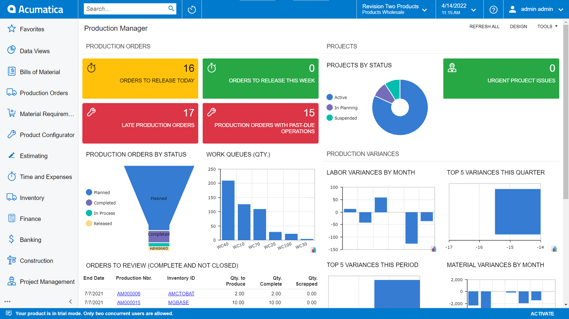
Acumatica is a cloud-based ERP solution that helps scale growing businesses and provides easy integrations with existing applications. The platform also offers AI-powered automation to improve organizational efficiency.
Acumatica can be tailored to any industry for an in-depth suite of tools to help grow your business.
Key features:
- Financial management integrates all financial operations for comprehensive oversight.
- Warehouse management system optimizes inventory and logistics operations.
- Accounting ensures accurate financial records and reporting.
- CRM provides tools for managing customer relationships and sales processes.
- Payroll manages employee payments and related compliance tasks.
- Construction management supports project management and cost tracking in construction.
- Manufacturing management oversees production processes and inventory.
What customers say: “We use Acumatica for our business ERP needs and it is well equipped and comes with great features including project-based ERP”
Rating: G2: 4.5/5
Pricing: Acumatica does not list pricing online.
10. Sage Intacct

What it is: ERP solution
Who it’s for: Sage is designed for teams of between 10 to 200 people. It’s also most suitable for distribution, manufacturing, and professional services although finance teams in most industries can customize the software to meet their needs
Sage is one of the oldest financial software companies in the industry and has a number of market-leading products in its portfolio.
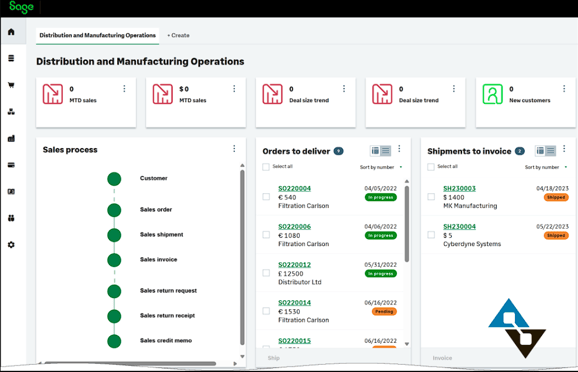
Sage Intacct is their ERP solution. It’s an AICPA-endorsed, cloud-based financial management software Sage is used by CFOs to automate complex processes, consolidate data, and support financial decisions.
This software comes with a good deal of customizability. You can use business object frameworks, connect it with Office 365 apps and Web APIs, and build a platform that meets your finance department’s needs.
Key features:
- Clean UI is easy to use and makes it easy to find data quickly.
- The platform is capable of handling complex costing and other manufacturing requirements.
- Software is cloud-based, with no need to download files locally, and it can be accessed from anywhere.
- Sage Intacct is easy to integrate with third-party apps and tools.
What customers say: “Sage Intacct is an incredibly comprehensive system. It allows you to focus with an unrivaled depth into any single aspect of your financials.”
Rating: G2: 4.3/5
Pricing: Pricing is not publicly available.
11. Oracle NetSuite

What it is: Oracle NetSuite is a complete all-in-one business management and ERP solution.
Who it’s for: This software is better suited to medium or large organizations with complex financial planning requirements that already use Oracle products.
Oracle NetSuite is a financial management and business system designed to help finance teams of any size organize their data more effectively. NetSuite lets you see real-time business insights at the click of a button and uses business intelligence to help with forecasting and scenario planning.
It’s one of the more comprehensive financial management solutions on the market and provides a wide range of tools and features.
.png?width=594&height=367&name=oracle-netsuite%20(1).png)
Key features:
- A central dashboard provides a comprehensive view of key financial and operational metrics.
- A single source of truth consolidates data across all business functions.
- Customizable options tailor the software to specific business needs.
- Real-time business insights facilitate timely and informed decision-making.
- The platform allows users to assign permissions for secure and efficient data access and collaboration.
What customers say: “It's a great tool when collaborating with procurement on things like vendor registration, onboarding and purchase order creation.”
Rating: G2: 4.1/5
Pricing: NetSuite provides custom pricing.
12. QuickBooks

What it is: Financial management and accounting software
Who it’s for: This software is designed for small- to medium-sized businesses. It helps finance teams collaborate more effectively, automate repetitive tasks, and streamline all aspects of a business’s finances
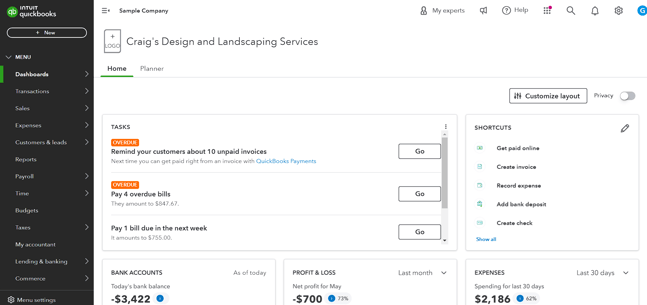
QuickBooks is a cloud-based, all-in-one accounting and financial management solution for small businesses. This software helps finance teams gain better control over their financial data. You can monitor KPIs, gain deeper insights into performance, collaborate with team members, and drill down into data via an interactive interface.
QuickBooks has a robust suite of reporting and analytical tools on the backend, making it easy to produce real-time performance reports and keep a close eye on metrics that matter.
Key features:
- Intuitive UI ensures ease of use for people without prior experience.
- Strong financial reporting tools generate detailed and customizable reports.
- Visuals like graphs and charts provide easy-to-understand data presentations.
- Centralized financial data channels all information into a single source of truth.
- The cloud-based platform offers flexibility and remote access to financial data.
What customers say: “QuickBooks has been a game-changer for managing our finances. It’s user-friendly, efficient, and makes tracking invoices, expenses, and reports simple and organized.”
Rating: G2: 4.4/5
Pricing:
- Simple Start: $30/mo
- Essentials: $70/mo
- Plus: $110/mo
- Advanced: $220/mo
13. FreshBooks
.png?width=235&height=69&name=freshbooks-logo-1%20(1).png)
What it is: Accounting and financial management software
Who it’s for: This software is better suited to smaller businesses and organizations that handle financials for clients
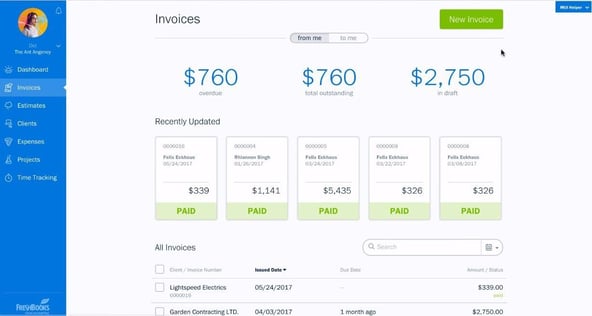
Freshbooks is a cloud-based accounting and financial management platform designed for small businesses. This software keeps financial data organized and produces reports based on real-time information. If you manage financials for clients, you can invite them to log in and view the data within FreshBooks.
Key features:
- The mobile app enables financial management on the go.
- Project creation and client invitations facilitate collaboration and transparency.
- Time-tracking tools monitor team productivity and project timelines.
- Centralized financial records simplify data management and reporting.
What customers say: “FreshBooks allows me to keep track of multiple clients with multiple projects each in a clean and organized manner.”
Rating: G2: 4.5/5
Pricing:
- Lite: $19/mo
- Plus: $38/mo
- Premium: $65/mo
- Select: Custom pricing available
14. SAP Business One

What it is: ERP
Who it’s for: SAP Business One is best for small businesses
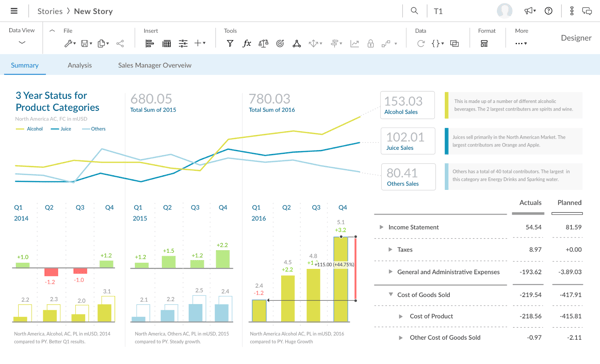
SAP Business One is an ERP solution offering an affordable way to manage any small business. You can streamline key processes, gain insights into your business, and make decisions on real-time information.
SAP Business One is a complete ERP software solution powered by AI and analytics.
Key features:
- Financial management integrates all financial activities for comprehensive oversight.
- Sales and customer management tools streamline interactions and sales operations.
- Purchasing and inventory control features manage procurement and stock levels efficiently.
- Business intelligence provides analytics and reporting for strategic insights.
- Cloud-based access ensures remote operations and data access.
- SAP HANA in-memory platform is stored on RAM for faster retrieval and processing.
- SAP applications and APIs connect you to the wider SAP ecosystem.
What customers say: “SAP Business One brings together finance, inventory, sales, CRM, purchasing, and production in a single system.”
Pricing: Pricing is not listed on their website.
15. Multiview ERP

What it is: ERP software
Who it’s for: Multiview is best for mid-market and enterprise companies
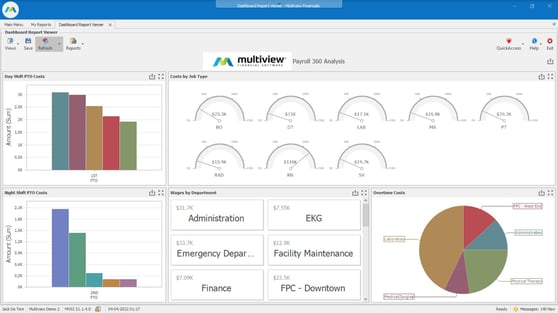
Multiview ERP offers a team of client support specialists to help implement their data-centric financial ERP software. This software helps break down data silos, automate accounting processes, and provide more access to information through reporting solutions.
Key features:
- The general ledger maintains accurate financial records and reporting.
- Accounts payable and receivable manage cash flow and financial transactions.
- Fixed assets management tracks and manages physical and financial assets.
- Budgeting and forecasting tools provide accurate financial planning and projections.
What customers say: “Implementation was an unexpectedly smooth transition because we had exceptional training. The software is highly customizable and we have tailored many of them to make them our own.”
Rating: G2: 4.3/5
Pricing: Pricing is not listed on their website.
16. Planful

What it is: Financial performance management software
Who it’s for: Mid-market and enterprise finance and accounting teams
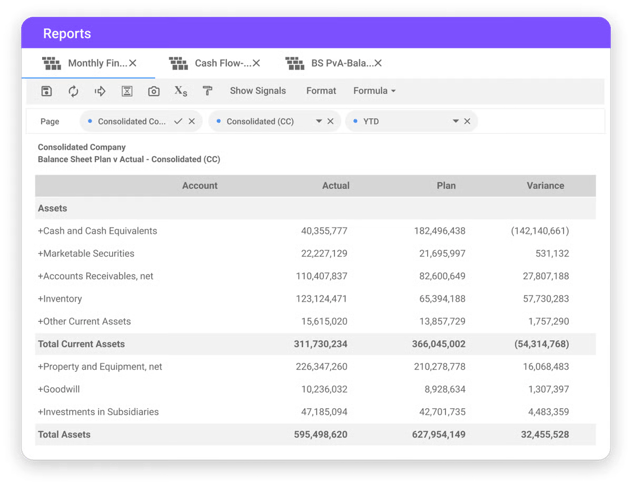
Planful is a cloud platform that connects planning, reporting, and accounting workflows in one system. It includes close and consolidation capabilities, supports forecasting and scenario work, and includes Planful AI features such as Analyst Assistant (natural-language analysis) and Signals (anomaly and risk flagging).
Key features:
- Close and consolidation workflows tied to reporting and planning in the same system.
- Budgeting, forecasting, and scenario modeling for FP&A cycles.
- Reporting and analysis with platform dashboards and finance reporting workflows.
- Planful AI Analyst Assistant for natural-language questions, trend and variance analysis.
- Planful AI Signals for anomaly detection, outliers, and audit readiness support.
What customers say: “The system offers a wide range of customization options, allowing businesses to tailor the environment to their unique needs, regardless of industry.”
Rating: G2: 4.3/5
Pricing: Planful's pricing is not publicly disclosed.
Other types of corporate finance software
While financial management software covers many functionalities, other specialized tools can address different aspects of corporate finance. Let’s explore some of the most common types and how they support businesses in their day-to-day operations.
Accounting software
Accounting software helps businesses handle critical financial tasks like recording revenue, tracking expenses, and generating financial statements. For example, small businesses might use it to create and send invoices, while larger companies depend on it to oversee department budgets and prepare financial reports.
Without accounting software, companies could struggle to track their cash flow, risk mismanaging funds, and face delays in paying bills or vendors, which could harm their financial stability.
Business intelligence
Business intelligence (BI) software analyzes financial data and presents it in visual formats like dashboards and reports. For instance, a CFO might use BI tools to evaluate trends in operational costs or assess which product lines are most profitable. Another common use is tracking sales performance to adjust marketing strategies.
Without BI tools, businesses may miss important insights, resulting in slow decision-making or missed opportunities to optimize performance.
Payroll management
Payroll management software automates paying employees, calculating taxes, and managing benefits. For example, HR teams can use it to track overtime hours, process direct deposits, and manage employee bonuses. It can also simplify payroll management for remote workers or international teams.
This software helps businesses avoid paycheck delays, errors in tax withholdings, or challenges in managing compensation across various locations.
Human resource information systems (HRIS)
Human resource information systems (HRIS) centralize employee data, including payroll, benefits, time tracking, and employment records, into one system so finance and HR can work from consistent information. By automating manual tasks like onboarding workflows, time approvals, benefits administration, and pay-related changes, an HRIS can reduce administrative effort and help limit costly errors.
HRIS platforms also support compliance by maintaining standardized records, access controls, and audit trails that make it easier to document policies and meet reporting requirements. For finance teams, the biggest value is workforce analytics: an HRIS can surface headcount trends, compensation changes, overtime patterns, and benefits costs, which helps improve budgeting, forecasting, and workforce planning.
What to consider when choosing the right corporate finance software
Here’s a checklist of features that you can look for to rank financial management tools according to your organization’s needs.
1. Ease of use
One of the most overlooked factors in any kind of software is how user friendly it is. It's easy to be impressed by an extensive feature list and ambitious promises about return on investment, but if your team doesn't buy into your vision because the platform is overcomplicated, the software won’t be as helpful as advertised.
Ease of use matters because it drives adoption. A 2024 study on AI adoption in accounting and auditing found that perceived ease of use positively influences adoption, alongside perceived usefulness.
You want to look for a tool you can quickly implement, and that integrates with your current systems to avoid a steep learning curve. An intuitive interface and clear navigation reduce training time, support consistent usage, and help your team manage financial operations without extensive, time-consuming ramp-up.
2. Scalability
It's not like finance teams to think short-term, so scalability is usually a top priority for choosing financial management software. As most systems are cloud-based, adjusting your subscription is relatively easy, but the costs and processes to do so can vary greatly.
If you're planning to scale, research whether the tool you choose can handle increased transactions, additional users, and more complex financial processes without a drop in performance.
3. Measurable ROI
Ultimately, the role of a financial management tool is to organize your cash flow in a way that saves you money. If it’s ineffective, or if the cost of running it is excessive compared to what it gives back, you might need to consider another option.
For some platforms, the cost isn’t just in the monthly subscription. You may need to lay down a hefty sum at the beginning to go through a mandatory, time-consuming onboarding process.
Make sure to consider the upfront costs, subscription fees, support fees, and training costs to maximize ROI.
5. Security features
Cyber attacks are on the rise, with costs projected to hit $10.5 trillion annually by 2025,
. The International Monetary Fund is even concerned that hackers targeting finance teams could affect global financial stability.
When looking for online finance tools, check that their security feature list contains data encryption, secure user authentication, and regular security updates. This protects both your own safety and that of your customers.
6. Integration
Corporate finance software should connect easily with the systems you already use. This typically includes accounting platforms, ERPs, payroll systems, CRMs, and data warehouses. Strong integrations reduce manual data entry, limit reconciliation issues, and keep financial data consistent across teams.
When evaluating tools, check whether integrations are native or API-based, how frequently data syncs, and whether connections support both historical and real-time data. Poor integrations often create reporting delays and introduce data quality risks that undermine planning and forecasting.
7. Cloud-based software
Cloud-based finance software allows teams to access financial data from anywhere without relying on local infrastructure. This supports remote work, multi-location teams, and faster collaboration during planning, close, and reporting cycles.
Cloud platforms also simplify updates and maintenance, since vendors handle patches, security updates, and feature releases. When assessing cloud tools, consider uptime reliability, data residency options, and whether the platform can support growth in users, entities, and transaction volume without performance issues.
8. AI technology add-ins
AI features can support finance teams by automating analysis, flagging anomalies, and improving forecast speed and consistency. Common use cases include variance detection, trend analysis, scenario projections, and natural-language querying of financial data.
Gartner reported that 58% of finance functions used AI in 2024, up sharply from 2023. Gartner Finance leaders also pointed to a clear near-term win for GenAI, with 66% saying it will have the most immediate impact on explaining forecast and budget variances.
Not all AI functionality delivers equal value. Look for tools that produce explainable outputs, fit into existing workflows, and let finance teams validate results. AI should reduce manual analysis time and strengthen decision-making, not create black-box answers that require extra review.
Benefits of using corporate financial software
FP&A analysts deal with many repetitive, manual, error-prone tasks that consume most of their time. Using software to handle integrations, calculations, sorting, and data presentation frees up more of their time to analyze data and advise the business. They can even reduce errors, improve data quality, and speed up cycle times with the structure and control of software applications.
Here are some of the main benefits of using corporate financial management software:
Automated repetitive manual tasks
Automation has transformed the speed, accuracy, and efficiency of accounting across the board. Teams report that they can complete financial processes 85 times faster with automation. For example, instead of manually entering each transaction into a ledger, the software automatically records transactions from bank feeds, reducing the risk of human error and freeing up employees to focus on more strategic tasks.
This isn't just a productivity booster. Automations allow customers to get more out of their employees, while the employees themselves get greater job satisfaction by eliminating tedious, time-consuming work.
Streamlined workflows
Financial software also does away with bloated, complicated workflows by integrating a range of apps together under one roof. Like automation, solving the unnecessary struggle of getting different systems to speak to each other coherently limits errors and increases productivity. With fewer moving parts, you can limit mistakes and accomplish rote tasks much more quickly.
Accessible financial data
As opposed to traditional methods, where you had to wait until the close of the day to be sure the numbers in your accounts departments were correct, financial management software syncs all your systems in real time.
This gives you a single source of truth and allows you to pull reports at any time and make quick decisions based on reliable data. The benefit spreads to other departments too. Finance tools convert sheets of numbers into simple visualizations to explain your decisions to a non-technical audience, enhancing cross-department collaboration.
Strategic business planning
Almost 80% of finance professionals agree or strongly agree that FP&A delivers value-added insight. Expensive data sets and insightful analytics allow you to go into far greater detail in your business planning. This kind of software gathers, stores, and processes all your historical data and blends them with recurring trends to plan for future economic downturns.
It speeds up the processes of comparing different scenarios, predicting financial outcomes, and preparing for potential challenges. This means anyone with the right report automation software can get actionable, data-driven insights with a few clicks of a button.
Seamless collaboration
Gone are the days when finance departments had to be huddled together in a single office for things to run smoothly. In fact, cloud-based solutions recently accounted for more than 67% of financial planning tools. Stored on the cloud, modern financial management solutions allow you to take advantage of the remote work revolution by hiring talent based all over the world and uniting the data used by teams in different offices.
It also helps financially-minded professionals get complex points across to other departments, superiors, and clients. The best financial management software will display profit and loss, sales figures, budgets, and more in charts, graphs, maps, infographics, and virtual dashboards.
Reduced margin of error
Finance professionals are detail-oriented and meticulous by nature, and they pride themselves on ensuring their work is error-free. Companies with “high technology acceptance” report a 75% reduction in errors when implementing financial technology.
This is where FP&A teams spend most of their time, checking and rechecking formulas, spreadsheet links, and subtotals for accuracy. But at the end of the day, they’re still human; sometimes mistakes happen and errors get missed. Financial management software provides automation, structure, and control that eliminates many core causes of errors in spreadsheets.
A lack of confidence in your numbers causes more than a headache and frustration in the office. It can lead to poor or delayed decision-making that puts you behind your competition. You also run the avoidable risk of regulatory non-compliance, which can lead to fines, penalties, and legal issues. These inefficiencies contribute to a lack of investor and stakeholder confidence, which puts your company’s success at risk.
Strengthened compliance and governance
Corporate financial software supports compliance by standardizing how data is collected, approved, updated, and reported. Instead of relying on ad hoc spreadsheets and manual handoffs, you get consistent workflows that enforce controls and reduce the chance of policy drift across teams.
Most platforms include role-based permissions, approval routing, segregation of duties, and audit trails that show who changed what, when, and why. That structure supports audits, improves close discipline, and helps teams maintain consistent reporting practices across entities, departments, and time periods.
It also supports governance by keeping key assumptions, rules, and reporting logic centralized. When teams use the same definitions for KPIs, accounts, and mappings, leaders see fewer discrepancies and spend less time reconciling versions of the truth.
Find the best corporate financial management software for your business
Financial management software plays a crucial role in managing and optimizing your organization's financial health and performance, but these platforms aren’t one-size-fits-all. Take some time to research and understand the strengths and weaknesses of each, and determine how they align with your needs and goals.
If your team wants a faster way to build financial reports, run multi-scenario forecasts, or complete sensitivity analysis without rebuilding everything in a new interface, Cube can fit that workflow. Cube works in Excel and Google Sheets, while adding structured workflows, audit trails, role-based controls, centralized KPIs, and automated roll-ups across connected data sources.
Cube also includes AI features that support analysis and help surface drivers behind the numbers, while keeping your team in control of assumptions and narrative. Its FP&Ai Suite includes purpose-built agents for data integrity, forecasting, and variance analysis that continuously work with your data and business context to help teams ask questions in plain English, get insights instead of raw numbers, and trust the outputs.
If you’re curious to see how a financial intelligence solution may work for your business, book a free demo with Cube.
